FROM THE FAMILY BINDER KIT
Monthly Bill Tracker for the New Year: Every Bill, Autopay and Subscription in One Place
One page a month for the bills, one page for everything that charges your card on its own, and one line a month for the whole year.
Start tonight, free: the Monthly Bills Tracker is one of the ten pages in our free Home Binder Starter. Get the starter ›
A new year is a natural time to get the bills onto one page. Autopay is convenient, but it also means nobody in the house can say, off the top of their head, what goes out each month, from which account, on which day.
A paper bill tracker fixes that in an evening, and it helps whoever might have to pay the bills for you one day. Below are the columns of the Monthly Bills Tracker, which is free in our starter, and the two money pages from the Family Binder Kit that go with it.
Money
The Monthly Bills Tracker, column by column
The instructions are one sentence: List every bill once. Check Autopay if it pays itself, and check Paid when it's done. Print a fresh page each month. At the top go the Month and Year.
Bill (who you pay)
The company, and what it is for if the name doesn't say: "Riverline, internet".
Due date
The day of the month. Sort the list by it if that helps you see the month.
Amount
The usual amount. For bills that change, write last month's and correct it when it comes.
Autopay?
A tick if it pays itself. These are the bills a family can forget exist.
Paid
A tick when it's done, for the ones you pay by hand.
Date paid · notes
The date, the check number, or "cancel?" next to the one you never use.
Total this month
One number at the bottom. Compare it with last month's page.

Set it up in one evening
- Open last month's bank and card statements. Every bill that went out is there, including the ones on autopay.
- Write each bill once. Mortgage or rent, utilities, phones, insurance, cards, loans, trash, memberships.
- Tick the autopay ones. Then note which card or account each one is charged to, last 4 digits only.
- Add the yearly and quarterly bills. Car registration, property tax, the trash bill that comes four times a year. Note the month they're due.
- Total it and keep the page. Next month, print a fresh one and copy the list across. It takes five minutes.
Money
The subscriptions nobody remembers
Autopay bills are on the tracker. Smaller charges hide on the card statement. The kit's Subscriptions & Autopay page is for Everything that charges a card or account on its own. Circle the ones you'd cancel.
Service and Amount
Music, cloud photos, the newspaper, the warehouse club, the meal kit, the gym.
How often and Renews
Monthly, yearly, weekly. The yearly ones are the surprises.
Charged to (last 4)
Which card. When a card is replaced, this is the list of what to update.
How to cancel
The detail people never have when they need it: in the app, in person, by phone only.

FREE · 10 PRINTABLE PAGES
Get the free Home Binder Starter
Ten pages to start the binder tonight: Emergency Contacts, Household at a Glance, the Medical One-Pager, a document inventory, a bills tracker, a password log and more. Sent to your inbox.
A January check-up for the bills
- Look for cards that expire this year. Every autopay on an expiring card will need the new number. The Charged to column tells you which ones.
- Find the yearly renewals. Memberships, software and warehouse clubs often renew in a month you've forgotten. Write the month in Renews.
- Circle one thing to cancel. The page asks you to. Most households find one.
- Check the price of each regular bill. Compare this month's amount with a year ago. A quiet increase shows up when the numbers sit side by side.
Where the pages live
Keep this month's tracker at the front of the Money tab, and last month's right behind it. After a year you have twelve pages that show every bill, every autopay and every total, which is handy at tax time and when a bill suddenly looks too high.
If two people share the bills, agree on one rule: whoever pays a bill ticks it. That single tick stops the same bill being paid twice and the other one not at all.
And if you would rather keep it on a screen, the pages are fillable PDFs. Fill them in on the computer and print the month when you want it on paper.
If you pay the bills for a parent
The tracker works the same way. Write your parent's name next to the month, list every bill once, and tick each one as it's paid. A page a month in the binder is a simple record for brothers and sisters who want to know where things stand, and for anyone who takes over later.
Keep the statements where they've always been. The tracker is the list, not the filing cabinet.
The year on one page
For the January look back and the December plan, the kit has Year at a Glance: Budget, with one line per month and columns for Money in, Regular bills, Everyday spending, One-time costs and Left over. Its rule is kind: One line per month. Round to the nearest dollar; close is good enough.
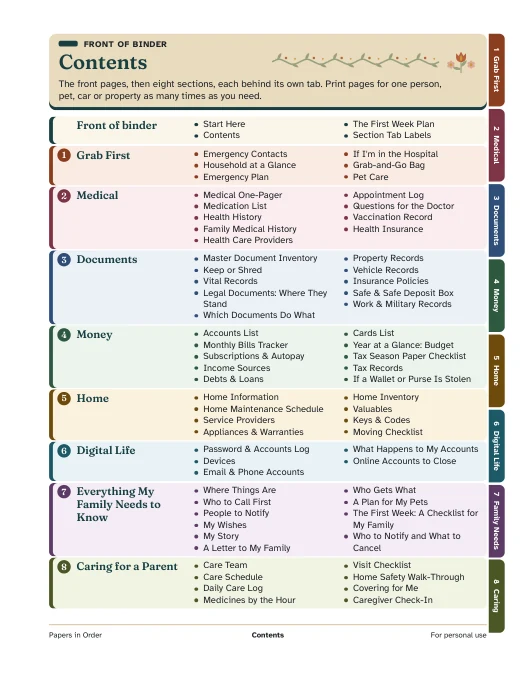
These pages are a record of what you pay, not financial advice. They sit in the Money section of the Family Binder Kit, with the Accounts List, Income Sources, Debts & Loans, the Cards List and the Tax Season Paper Checklist.